

Ausmed is a Trusted Information Partner of Healthdirect Australia. Verify here.


© 2026 Ausmed Pty Ltd (ABN: 33 107 354 441)
For quality, clinical governance and L&D leads at registered aged care providers. Training plans, assessor sign-off and policy acknowledgement keep an Ausmed record current for each workforce action an assessor tests. The Audit Report pulls it together when the audit is booked.
Book a walkthroughThe Commission audits providers in registration categories 4, 5 and 6 against the Strengthened Aged Care Quality Standards when they register and when they renew. It tests residential homes against all seven, and home care against the Standards for its category.
A major non-conformance follows when a provider can't show it has set up the system an outcome asks for. For the workforce outcomes, showing means records.
When those records are spread across an LMS, an HR system, site folders and inboxes, someone spends the weeks before the audit piecing them back together.
Ausmed makes each record at the moment the work happens: a module completed, a skill observed and signed off, a policy version acknowledged, a probation review closed. The Audit Report then reads from those records.
Start with the free Audit Readiness Tool, or go through the workforce actions below one at a time.
Request the Audit Readiness ToolHold every record against the worker in one system, and the evidence for each action comes from one place instead of an LMS, an HR system and folders at each home. Open any action to see what it asks and the features that produce its evidence.
Action 2.3.7 asks for policies that are current, reviewed and understood by workers. Emailing the new version to every home shows you sent it, and nothing more.
Assign each policy to the teams, roles or locations it applies to.
Powered by
Ausmed records who acknowledged each policy, when, and which version. Staff acknowledge on the web or their phone, with reminders before and after the due date.
Powered by
Each policy holds its owner and review date, so reviews don’t lapse. Publish a new version and past records stay in its version history.
Powered by
Actions 2.3.2 and 5.1.1 have the governing body monitor performance and the safety and quality of clinical systems. That needs figures it receives on a regular cycle.
A structured report for a monthly or quarterly meeting, showing high-level risk and progress on training and policy compliance.
Powered by
Ausmed keeps each month’s report. The board can see the trend, and you can show an assessor what the board was given, and when.
Powered by
Actions 2.9.4 (c) and 2.5.4 tie training to incidents. After one, an assessor will want to know what changed and for whom.
Assign training to the home, team or role involved, with a due date.
Powered by
Publish the updated procedure and assign it to the staff who need to acknowledge it. The policy report lists who hasn’t acknowledged.
Powered by
Each worker’s record shows what they had completed before the incident and what you assigned after it.
Powered by
Action 2.8.1 (c) asks you to identify the skills, qualifications and competencies required for each role. In many homes that list is a spreadsheet one person keeps current.
Hold the role matrix as training plans by job role.
Powered by
Ausmed enrols a new starter in the plans for their role and site. A worker who changes role or home picks up the new requirements without anyone re-entering them.
Powered by
Each worker’s record shows what they’ve met and what’s outstanding for the role they hold today.
Powered by
Pre-employment checks such as police checks normally live in your HR system. Ausmed holds the learning side of the record.
The provider maintains records of aged care worker pre-employment checks, contact details, qualifications and experience.
Add qualifications and prior learning against the worker, including from before they joined, with the certificate uploaded as evidence.
Powered by
Role, location and manager stay in step with your HR system, so the training record and the employment record describe the same person on audit day.
Powered by
Providers mostly meet Actions 2.9.3 and 2.9.7 in conversation, in a manager’s office or at the nurses’ station, and leave nothing behind unless someone writes them down.
Run probation programs and annual, bi-annual or quarterly reviews from organisation-wide templates, so each review opens on schedule.
Powered by
Supervisors record one-on-one and team meetings and notes against the worker.
Powered by
Managers see what’s due and overdue by team, location, job role and manager, and can export the evidence for an audit.
Powered by
An assessor testing Action 2.9.4 wants to see the training system itself, and what it did when something went wrong.
The provider maintains and implements a training system that:
a) includes training strategies to ensure that aged care workers have the necessary skills, qualifications and competencies to effectively perform their roles
b) draws on the experience of individuals to inform training strategies
c) is responsive to feedback, complaints, incidents, identified risks and the outcomes of regular aged care worker performance reviews.
Assign mandatory requirements by job role, team and location. They repeat on the cycle you set, with reminders before each one falls due.
Powered by
Training you assign after an incident, a complaint or a performance review sits on the same record, with the date you assigned it.
Powered by
For the Action 2.9.5 review, the report shows coverage and gaps against the Strengthened Standards.
Powered by
Knowledge Verification adds a measure of what workers already know on eligible modules, beside completion.
Powered by
To see where you stand now, request the free Strengthened Standards Training Analysis.
Request the Training AnalysisAction 2.9.6 asks for competency-based training in each core matter, so the evidence is the training and an observed assessment together.
All aged care workers regularly receive competency-based training in relation to core matters, at a minimum:
a) the delivery of person-centred, rights-based care
b) culturally safe, trauma aware and healing informed care
c) caring for individuals living with dementia
d) responding to medical emergencies
e) the requirements of the Code of Conduct, the Serious Incident Response Scheme, the Quality Standards and other requirements relevant to the aged care worker's role.
Put the modules on dementia, the Code of Conduct for Aged Care and the Serious Incident Response Scheme into each worker’s training plan, with a practical activity beside them.
Powered by
A named assessor observes the practical part and signs it off. The sign-off completes that activity in the plan, so each worker’s record holds the module and the assessment for the same core matter.
Powered by
Action 4.2.1 (a) asks for an appropriately qualified and trained infection prevention and control lead. The evidence is what your organisation decided the role needs and what the person in it has done.
Add the lead’s qualification to their Ausmed record as a learning record, with the certificate attached.
Powered by
Assign the lead’s ongoing training through a training plan for the role.
Powered by
Everyone else gets infection prevention and control modules from the Aged Care Library, repeating each year, through the training plans that carry the rest of your mandatory training.
Powered by
Action 5.1.3 asks that workers providing clinical care are qualified, competent and working within their scope. For a registered nurse or a care worker assisting with medication, competent means someone observed the procedure.
An authorised assessor works through observation and knowledge questions on a phone or tablet, marks each element Satisfactory or Not Yet Satisfactory, and signs off with their name and a time stamp.
Powered by
Dashboards show who is competent and not yet competent by team, role or location. Every attempt stays in the history.
Powered by
Start from ready-made templates for aged and home care settings, or build your own against your procedures.
Powered by
Educators often teach fire safety, manual handling and hand hygiene in a room, and the attendance sheet ends up in a folder at the home.
These sessions are managed in Ausmed. Staff enrol with their manager's approval, and a full session keeps a waitlist. Facilitators mark attendance on a phone, so it reaches the worker's record on the day and completes the linked practical activity in their training plan.
Training done elsewhere goes on the same record: Ausmed Learn™ adds learning completed outside the LMS against the worker, with the sign-in sheet or certificate attached as evidence.
In-person training and assessments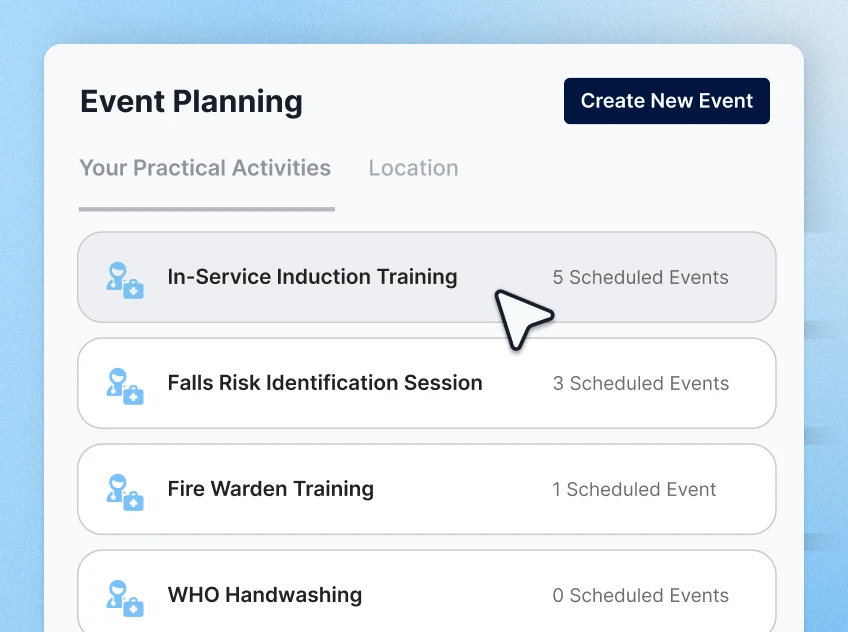
Naomi Taylor, Operations Manager, Cooinda
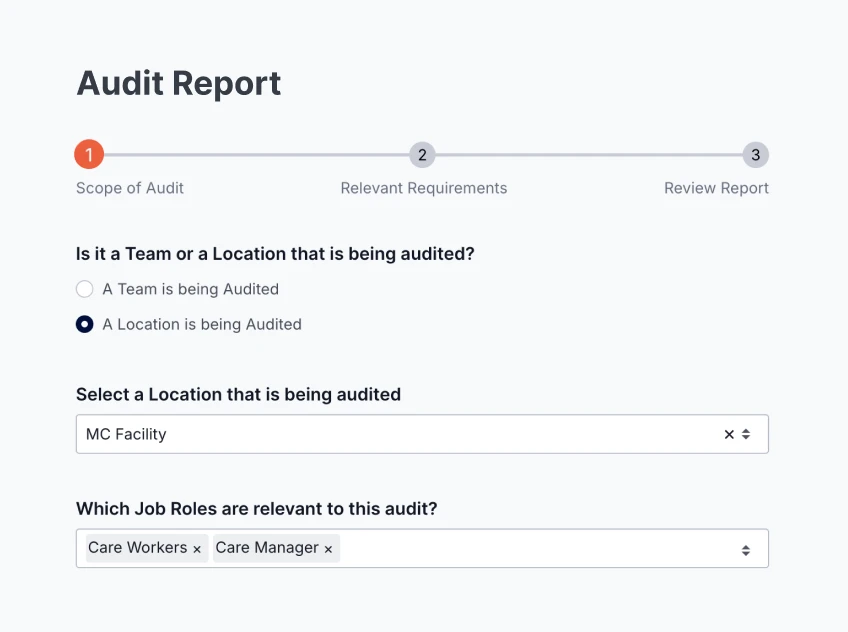
You scope the Audit Report in Ausmed Analytics™ to the teams and locations under audit, and choose the requirements in scope from your training plans.
It sets out requirements met by job role and by item, and lists staff with unmet requirements, with room for your comments. A terminology section defines Met, New, Unmet, Extended and Waived.
Add your own narrative, then download it as a PDF or share it by link.
Assessors may also ask workers about their own training. A record that holds assessment as well as completion is easier to stand behind when they do.
Compliance reportingTraining plans by role and site, face-to-face and outside learning on the same record, and a Regulatory Standards report against each Standard.
Ausmed Learn™Observed assessment and named sign-off for the 2.9.6 core matters and the clinical tasks each role performs.
Ausmed Competency™Audit and Board Reports over your training and policy compliance, kept month by month.
Ausmed Analytics™Tell us when your next audit is and which homes or services are in scope, and we'll show you what the evidence would look like in Ausmed.
No, and be wary of anyone who says otherwise. Ausmed keeps your workforce evidence complete and current, and you can pull it for any home or role when asked.
Whether your care meets the Standards is for your organisation to show and the Commission to judge.
No. Mapping shows which Standards your training covers and where the gaps are. It doesn't make you compliant on its own, and an assessor will look at what workers do as well as what they completed.
Yes. Add learning records against a worker, including from before they joined, and upload the certificate as evidence, so the record is complete without a second spreadsheet.
Ausmed holds ISO 27001 certification for information security. More providers now have to evidence this for their own supply chain.
Ausmed is a Trusted Information Partner of Healthdirect Australia. Verify here.